In short: Regular expressions (RegEx) are search patterns used to filter and segment data in Google Search Console and Google Analytics 4. In SEO they let you separate brand traffic from non-brand, identify long tails, group URLs by section without subfolders, and analyze page types. GSC uses partial matching; GA4 uses full matching, and GSC has a 4096 character limit per filter.
If you work in SEO and you have not added regular expressions to your toolkit yet, you are leaving one of the highest-potential tools for data analysis on the table. Google Search Console and Google Analytics 4 both support filtering data with RegEx, and knowing how to use them changes the way you understand a project’s performance and make strategic decisions based on data. In this article we explain what they are, how they work, and above all how to get value out of them with practical use cases that apply directly to your daily work.
What regular expressions are and why they matter for SEO
A regular expression (or RegEx, short for Regular Expression) is a sequence of characters that defines a search pattern. Put another way: it is how you tell a tool “give me everything that matches these conditions” without having to write or look up each case one by one.
RegEx are not new. They have been used in programming for decades, in languages like Python, JavaScript and PHP, to find, extract and transform text. But it is when you apply them to SEO, specifically inside analytics tools like GSC and GA4, that they bring the most value to the day-to-day of a consultant or analyst.
Why are they so useful in SEO? Because websites generate huge volumes of data: thousands of URLs, tens of thousands of organic queries, millions of sessions. Without advanced filters, analyzing that data is like looking for a needle in a haystack. Regular expressions let you define precise patterns to segment, filter and group information in ways that no standard filter can handle.
Some examples of what you can do:
- Filter every URL in a specific section of the site (even when there is no clear subfolder).
- Separate brand search queries from non-brand ones.
- Identify keywords with informational, transactional or comparative intent.
- Segment GA4 traffic by page type (product page, category, blog post and so on).
The minimum basics you need to know
You do not need to be a programmer to use RegEx in SEO. With a handful of basic operators you can already build powerful filters. Here are the most essential rules:
Wildcards
| Symbol | Meaning | Example RegEx | Example match |
|---|---|---|---|
. | Any character | a.b | ”acb”, “a1b” |
* | The previous element, 0 or more times | ca*sa | ”csa”, “casa”, “caasa” |
+ | The previous element, 1 or more times | ca+sa | ”casa”, “caasa” (not “csa”) |
? | The previous element, 0 or 1 time | colou?r | ”color” or “colour” |
| | Logical OR, any of the terms | cat|dog | ”cat” or “dog” |
Anchors
| Symbol | Meaning | Example RegEx | Example match |
|---|---|---|---|
^ | Start of string | ^/blog | URLs starting with /blog |
$ | End of string | \.html$ | URLs ending in .html |
Groups
| Symbol | Meaning | Example RegEx | Example match |
|---|---|---|---|
[ ] | Any character inside the group | [0-9] | any digit |
() | Grouping | (cat|dog)s | ”cats” or “dogs” |
Escaping
| Symbol | Meaning | Example RegEx |
|---|---|---|
\ | The adjacent character must be read literally | \. means the dot is read as a literal dot or decimal, not a wildcard. |
Other useful operators
{n,m}: repetition between n and m times. Example:{5,10}allows strings between 5 and 10 characters.\d: numeric digit. Example:\d+captures one or more numbers.\w: alphanumeric character or underscore. Example:\w+captures one or more word characters.
With these building blocks and a bit of imagination you can already build the vast majority of useful SEO filters.
AI as an ally for building regular expressions
AI is now a remarkable tool for generating regular expressions. You can describe in plain English what you want to filter and get the corresponding RegEx in seconds.
That said, here is the catch: copying and pasting whatever the AI gives you is not enough. You need a baseline knowledge of RegEx so you can review the expression, spot errors, and above all describe to the AI exactly what you need. A vague instruction produces a vague RegEx. Knowing precisely what you want, and knowing how to verify the output, is what separates a correct result from a wrong one.
RegEx in Google Search Console
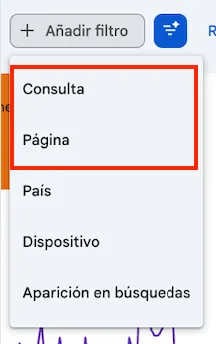
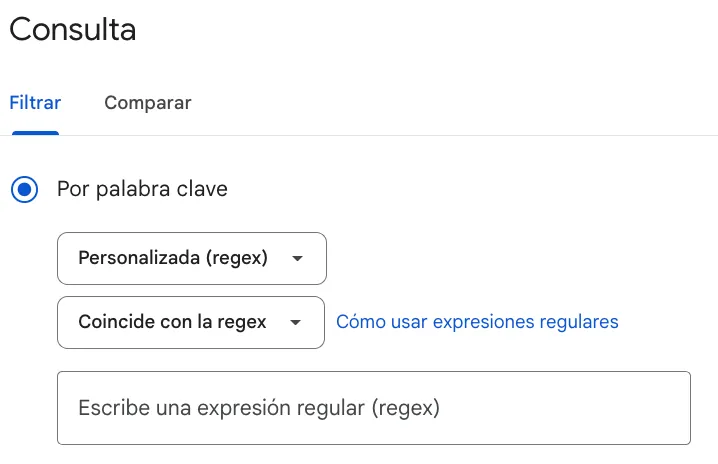
Google Search Console supports RegEx in two main contexts inside the performance report: the Pages filter (URLs) and the Queries filter (keywords). Access is the same in both cases: in the filters area, click ”+ Add filter”, choose “Pages” or “Queries”, and pick “Custom (regex)”.

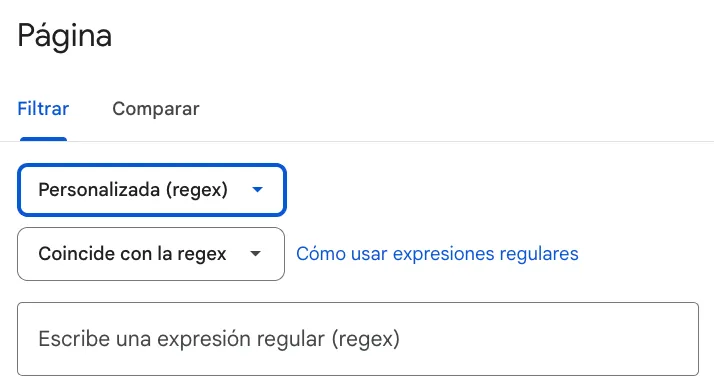
Filtering pages and URLs
This is one of the most powerful and least exploited uses of RegEx in GSC. Well structured projects have clear subfolders (/blog/, /products/, /category/), but plenty of sites do not follow a clean structure, and that is where regular expressions let you segment despite the lack of clear markers and work around the limits of simple filters (“matches” and “does not match”).
Here are some of the most frequent and useful patterns:
Filter multiple sections at once:
Often filtering by a single subfolder is not enough and you want to analyze several at the same time. You can do it with:
/blog|/news|/guidesThis returns only URLs that belong to one of those three sections.
Identify product pages without a clear subfolder:
This is a common e-commerce case. Many online stores use product URLs like /product-name-blue-size-m-ref123, without a /product/ subfolder. In those cases, you can use shared traits of those URLs to isolate them.
A useful technique is filtering by URL length, because product pages tend to be substantially longer than categories or the home. For example, to show URLs longer than 50 characters:
^.{51,}$Changing the number lets you filter for shorter or longer URLs.
Another common pattern in product URL construction is the use of IDs, so numbers appear in the URL. Using the earlier example (/product-name-blue-size-m-ref123) we can filter URLs containing numbers with:
[0-9]An equivalent RegEx, as we saw at the start, is:
\dFind URLs by subfolder depth:
^https?://[^/]+(/[^/]+){X,}Other times you need to find deep URLs or ones with a specific number of subfolders. In this example RegEx you can find URLs at the depth you want by replacing X with the minimum depth. For example:
^https?://[^/]+(/[^/]+){2,}This returns URLs at a depth equal to or greater than two subfolders.
Filtering queries (keywords)
Query analysis with RegEx also unlocks a lot of value for SEO. Here are the most common applications across project types:
Filter brand queries:
This is one of the most important analyses in SEO: separating branded traffic from non-branded is essential to evaluate the real impact of organic positioning.
Sometimes the different spellings of your brand make this hard with simple filters. The following pattern makes it easy to capture every variant of your brand:
variant1|variant2|variant3For SEOCOM.Agency, you could apply:
seocom|seo com|seocom.agency|seocomagencyFind long tail keywords:
Long tail queries usually have 4 or more words. You can approximate by counting spaces:
(\w+ ){3,}\w+Changing the number inside the regex lets you tune the filter to your needs.
Identify informational intent:
^(what|how|when|where|why|which|who|whom|whose)This filter catches queries starting with question words, the clearest markers of informational intent. It is great for spotting content opportunities or measuring blog performance against transactional pages.
Detect price or comparison attributes:
cheap|affordable|price|cost|deal|discount|best|comparison|vs|alternative|reviewThis catches queries where the user is researching purchase comparisons or showing price sensitivity. Useful for e-commerce and for identifying “the best X for Y” content opportunities.
This is a simple, easy to modify pattern so you can swap in the attributes that fit your business.
Filter by sector or topic:
Another straightforward use is grouping queries by topic, handy when you want to analyze a thematic cluster or look for cannibalization.
The construction is the same as before, using the | character.
For example, to focus on the topic “seo positioning”:
seo|organic|google|positioningIdentify queries with numbers or years:
\d{4}Very useful for spotting searches with a year in them (guides, rankings, updated comparisons) so you can tell whether your content is optimized for that timeframe.
The potential of RegEx in GSC
Regular expressions in Google Search Console turn a tool many people use superficially into a real advanced analytics system. The key is to think in patterns: what the URLs or queries you care about have in common, and how to express it in a way the filter understands. With practice, building these filters becomes natural, and the insights they unlock can completely change how you read a project.
RegEx in Google Analytics 4
GA4 supports regular expressions in segments, audiences, explorations and report filters. While in GSC RegEx is mostly about analyzing organic performance, in GA4 the field expands to all user behavior.
Differences between RegEx in GSC and GA4
Although both tools accept regular expressions, their behavior is different. Knowing these differences saves you from common mistakes when porting filters between them.
| Aspect | Google Search Console | Google Analytics 4 |
|---|---|---|
| Default match type | Partial | Full |
Needs .* for ^something to work | No | Yes (^something.*) |
| Case sensitive | Yes (default) | Yes (default) |
| Character limit per filter | 4096 characters | No documented limit |
| Syntax | RE2 (Google) | RE2 (Google) |
| Main application | Filter pages and queries | Segments, audiences, explorations, events |
A RegEx that works in GSC usually needs adaptation when moved to GA4. The most common mistake is writing ^/blog in GA4 expecting partial matching: you need ^/blog.* for it to return results.
Where to apply RegEx in GA4
The main entry points are:
- Explorations
- Standard reports
- Segments and audiences
- Referral exclusions
- Internal and developer traffic filters
- Custom channels
- Content groups
Segmenting by topic and page type
This is, by far, the most valuable application of RegEx in GA4 for SEO. A website is not a monolithic block: it has sections with different purposes, different audiences and different behaviors. Looking at everything together distorts the picture.
Proper segmentation lets you answer questions like:
- Which page type generates the most conversions?
- What is the traffic retention in the blog?
- How do users who first land on a category behave compared to those who land directly on a product?
Segmenting by page types
As we saw earlier, RegEx are very useful for segmenting sites that do not have subfolder-based structures. For SEO analysis, telling apart different page types is essential, especially on site types like e-commerce (categories, products, blog, landings and so on).
To segment the different page types of a site without subfolders, you have to find patterns common to each type that exclude the rest:
- URL length:
^https?://[^/]+(/[^/]+){2,} - Presence of numbers:
\d - Contains certain words:
word1|word2|word3 - Character length:
^.{51,}$
Segmenting by thematic sections
Topic segmentation is equally critical. Performance by topic gives you key information to understand how Google reads and prioritizes your site. This kind of analysis tells you which segments have the most potential and which ones need extra work to build authority and relevance.
Just like with page-type segmentation, the issue appears when there is no subfolder structure tagging the topics. In that case, RegEx segmentation tends to focus on finding shared words per topic, since URL construction is rarely a common, distinguishing factor.
The most useful RegEx pattern here is:
word1|word2|word3This is the base you will use the most, and you can combine it with other operators to be more specific or segment concrete sections. For example, to segment topics inside the blog:
^/blog/(technology|marketing|seo|social-media)Combining segments with sources and metrics
Where RegEx really pays off in GA4 is in the wide range of metrics and filters you can combine to make analysis more precise.
The main recommendation for SEO is to always filter by organic traffic channel. Once you combine your segmentation RegEx with the organic source, you can start analyzing many aspects of performance and user behavior on your site.
- Segments with the most traffic
- Segments with the highest conversion
- Performance and conversion ratios per page
- Average user interaction time per segment
Frequently asked questions about RegEx in SEO
Do GSC and GA4 use the same kind of RegEx?
Both tools use Google’s RE2 syntax, but with different default behavior. GSC applies partial matching automatically: /blog finds any URL containing /blog. GA4 applies full matching: for the same result you have to write .*\/blog.*. This is the most common cause of RegEx that work in one tool but not the other.
What is the character limit for RegEx in Google Search Console?
GSC has a limit of 4096 characters per RegEx filter. If you need to filter many variants (for example, 200+ brands), it helps to compact the pattern using groups (option1|option2|option3) instead of separate lists. GA4 does not have such a well documented limit, but for performance reasons keeping patterns simple is recommended.
Do I need to know how to code to use RegEx in SEO?
No. For the standard SEO use cases (filtering URLs, separating brand from non-brand, identifying intent) you can get by with 6 to 8 basic operators: ^, $, ., *, +, ?, | and []. That covers 90% of the filters you will need in GSC and GA4.
Why does my RegEx work in GSC but not in GA4?
The most common cause is the partial vs full matching difference. If your RegEx starts with ^ or ends with $, it works in GSC thanks to the implicit partial matching; in GA4 you need to add .* to extend the pattern. Another frequent cause is escaping: in GA4 the dot . must be \. when used as a literal.
Can AI replace RegEx knowledge?
AI speeds up RegEx creation, but it does not replace judgement. An imprecise instruction produces an imprecise RegEx, and without baseline knowledge you cannot tell whether the output is correct or hides subtle errors that only surface in edge cases. The combination works: AI builds the pattern, you verify it meets the real use case.
Are there tools to validate RegEx before applying them?
Yes. Regex101 lets you test patterns against sample strings in real time and explains each part of the pattern. RegExr is an alternative with graphical visualization. Both are free and very useful before applying a RegEx in GSC or GA4 on real data.
Conclusion
Regular expressions are one of those tools that, once you start using them, you cannot picture SEO analysis without. It is not about memorizing syntax: it is about developing the ability to think in patterns and translate them into a language the tools understand.
With the AI available today, the technical barrier is minimal. But conceptual knowledge, knowing what you want to measure, how to structure the pattern and how to validate that the result is correct, stays 100% human. That combination of analytical judgement and technical efficiency is exactly what separates surface-level SEO analysis from genuinely actionable insight.
Start with the simpler use cases in GSC, build confidence and then move on to GA4. In a short time you will have folded RegEx into your regular workflow, and your analysis will reach a quality level that lifts the performance of your strategies directly.