Screaming Frog now lets you run custom JavaScript during the crawl. The most useful trick this opens up is connecting ChatGPT directly to whatever URLs you are crawling.
In this post I walk through the setup. If you prefer the video version, here it is:
Steps to run ChatGPT inside Screaming Frog
- Enable JavaScript rendering in Screaming Frog: Crawl Configuration > Rendering.
- Make sure your ChatGPT Business account has API credits. The first test costs around 10 dollars added to the account, same as I needed. The integration only works on paid OpenAI accounts.
- Before launching the crawl, open Crawl Configuration > Custom JavaScript and click “Add from library”.
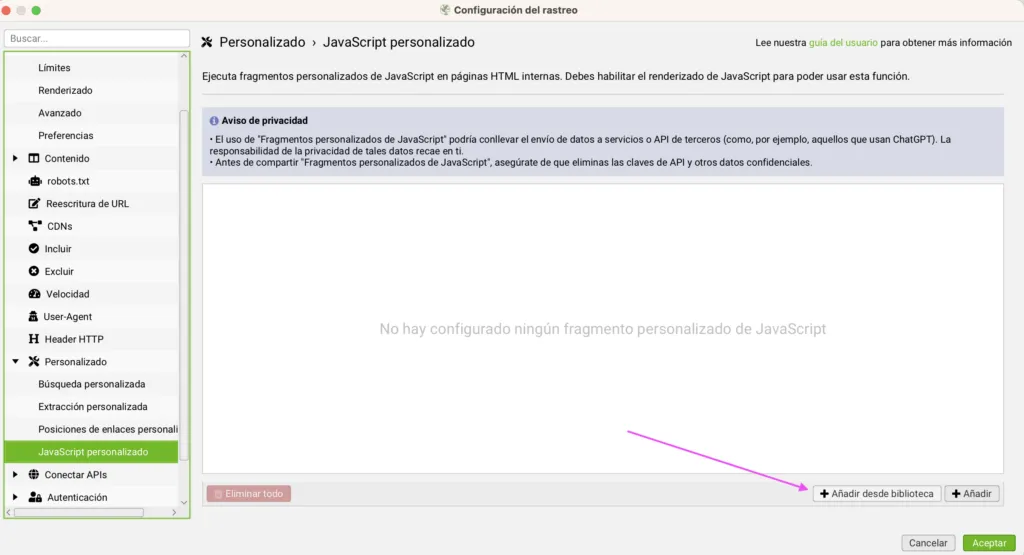
You will see the default options plus a custom slot. Pick the one labelled (ChatGPT) Template.
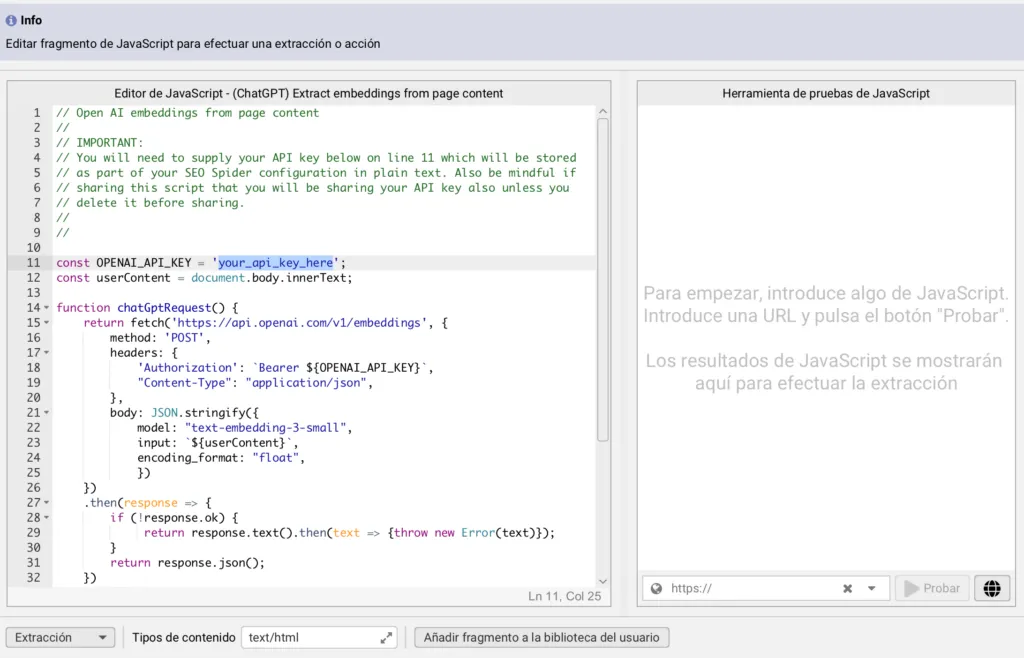
- With the template selected, click the JS button to add your OpenAI API key. Paste the key on the left side of the panel as shown below. The right side lets you test the prompt before launching the crawl.

The crawl burns OpenAI API calls page by page. Pick the URLs you crawl carefully or the bill stacks up faster than you expect.